


Trade show screens
Animated QR visuals for booth displays and demos.





Shape, material, object color, depth, bevel, shadow, and line texture.
Pick the frame style.
Free preview supports a basic URL plaque. Paid workspaces add saved printable records, keychain holes, NFC pockets, labels, tags, and dashboard export history. See printable QR guidance.
Static QR only on this page. Transparent PNG is ready, and SVG export keeps the template vector. Use an SVG logo for a fully vector-ready file.Rotate the 3D object, tune the material, line texture, shadow, and export a transparent PNG.

A static QR code stores the final destination directly inside the QR pattern. It is simple, fast, and useful when the link will never change. A dynamic QR code stores a UNIQR short redirect link inside the QR pattern, then sends scanners to the destination saved in your dashboard.
Dynamic QR is better for campaigns, menus, forms, flyers, events, and printed material because you can update the destination later without reprinting the QR code. It also enables scan tracking, scan limits, active dates, project organization, and integrations.
You can edit the destination of a dynamic QR code after it has been printed because the printed QR points to a stable redirect link. That is the safest choice for business cards, signs, menus, event badges, direct mail, and anything expensive to reprint.
A static QR code cannot be edited after export because the final destination is already built into the QR pattern. If the destination changes, you need to generate and distribute a new static QR code.
Dynamic QR scan logs can capture practical campaign signals such as scan time, total scan count, device type, browser, operating system, approximate location signals, referrer when available, and the QR record that received the scan. The exact data can vary by browser, device, privacy settings, and network.
This information helps teams compare flyers, locations, events, placements, and campaigns. It is most useful when each campaign has its own QR code, project, tags, and UTM fields.
Use strong contrast, keep enough quiet space around the QR code, avoid covering too much of the center with a logo, and test the final file on multiple phones before printing. For small labels or textured materials, choose a simpler QR style and increase the printed size.
For print, export a high-resolution PNG, SVG, or flattened PDF. For screens, test at the real viewing distance. A QR that scans on your monitor may need to be larger on a poster, trade show screen, vehicle decal, or menu board.
Yes, but logos need care. UNIQR supports custom logos and spacing controls so your design can stay branded without blocking too many QR modules. Error correction helps, but it is not magic. A large logo, low contrast, a busy background, or too little quiet space can make a QR code harder to scan.
For important printed campaigns, keep the logo modest, use high contrast, test the exported file, and keep a clean fallback version available. If the QR will be 3D printed, be even more conservative because physical material, shadows, and printer tolerances can reduce readability.
For a local business, this is a very helpful tool. I can make QR codes for specials, posters, business cards, and events without needing a designer every time. It is simple, but still feels professional.
 Alicia Chen
Small Business Owner | Metro Services
Alicia Chen
Small Business Owner | Metro Services
I used UNIQR for an event poster, and it worked really well. The QR code was quick to make, looked clean, and the dynamic link option saved me when I needed to update the destination later.
I like how simple UNIQR is. You can create a QR code quickly, add your branding, and download it without a complicated setup. Great for flyers, posters, and business promotions.
 Priya Raman
Communications Director | Civic Outreach
Priya Raman
Communications Director | Civic Outreach
We used UNIQR for a community event, and it helped us keep everything simple. The QR code looked professional on our printed materials, and we liked being able to update the link without recreating the whole thing.
 Sean Kvingedal
Community Program Lead | Civic Outreach
Sean Kvingedal
Community Program Lead | Civic Outreach
This tool was very easy to use. I created a QR code for our menu, matched it with our brand color, and downloaded it without any trouble. I like that I can update the link later instead of printing everything again.
 Michael Thompson
Restaurant Owner | ThomsCook
Michael Thompson
Restaurant Owner | ThomsCook
UNIQR gives more design control than a basic QR generator. The branded templates, color options, and 3D QR styles make it easier to create something that fits a campaign instead of looking generic.
Learn practical ways to use QR codes for print, events, campaigns, tracking, and 3D QR experiences.
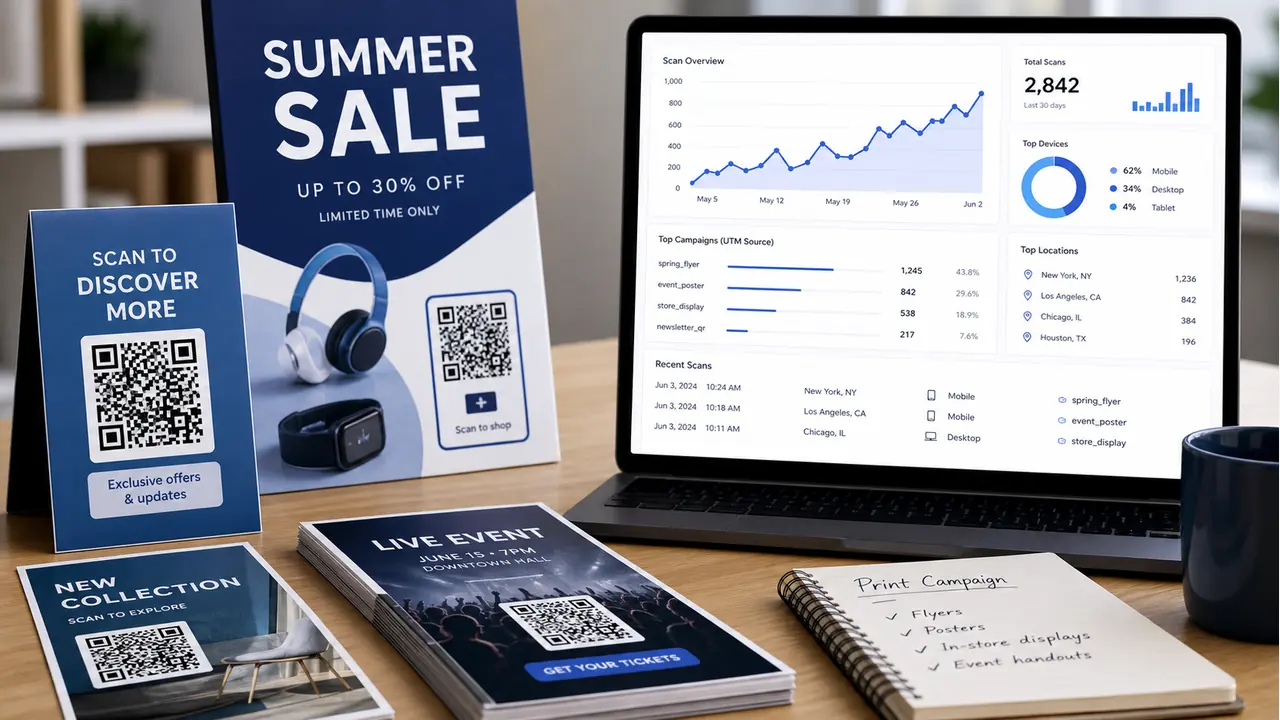
See how QR code tracking helps flyers, posters, mailers, and signs measure scans, traffic, locations, devices, and campaign results.
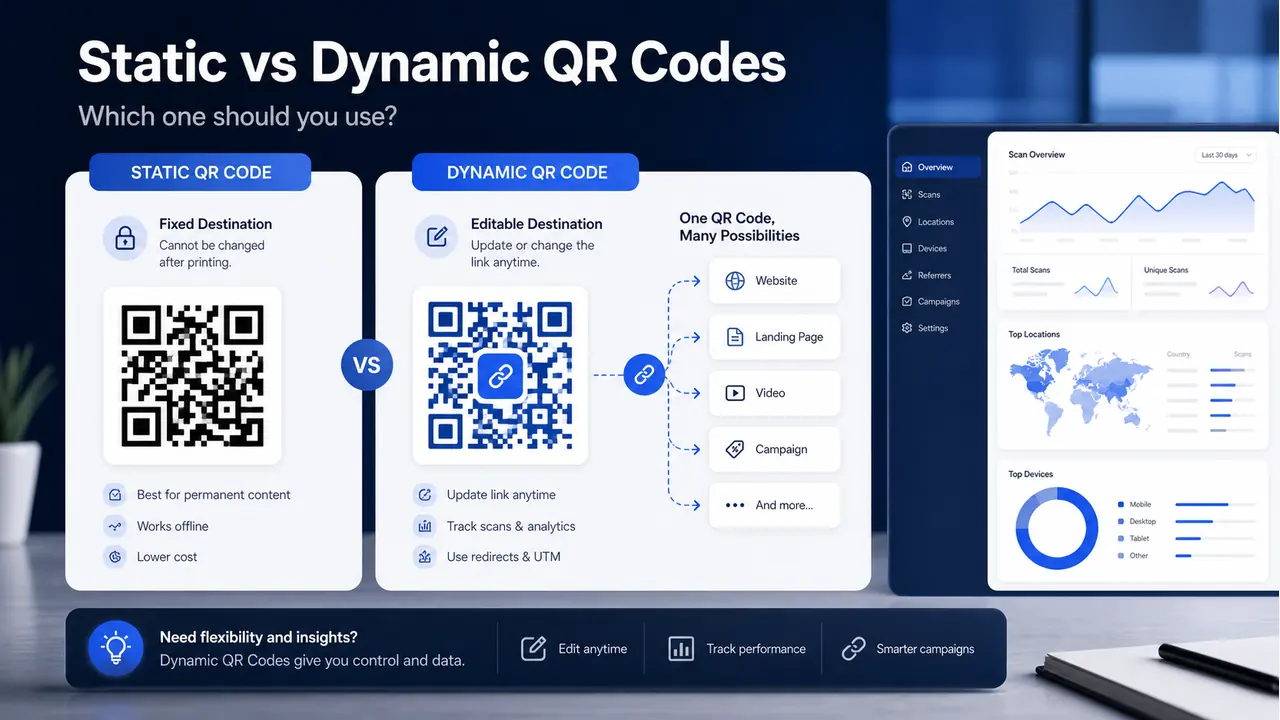
Learn the difference between static and dynamic QR codes, when to use each, and why dynamic QR codes are better for campaigns.
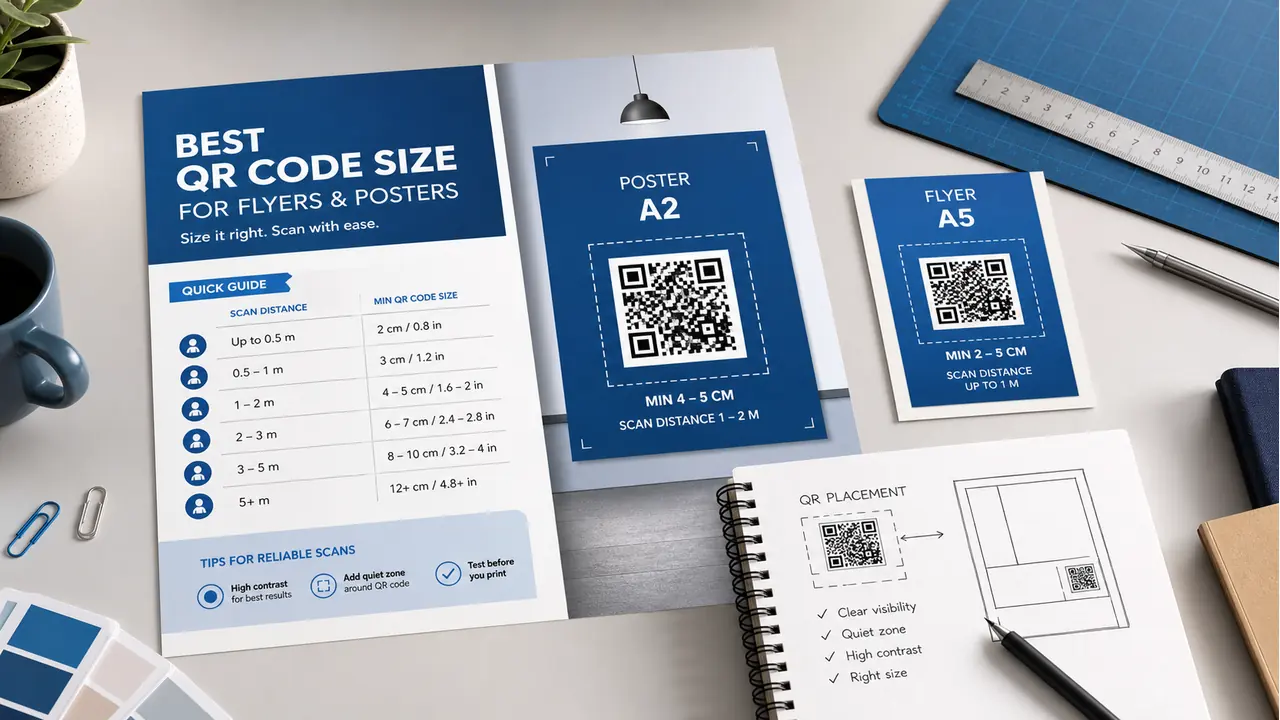
Learn the best QR code size for flyers, posters, signs, and printed materials so people can scan quickly without frustration.

Use high contrast, test scans before printing, and keep logos small enough for reliable scanning.