
Best QR code size for flyers and posters
Learn the best QR code size for flyers, posters, signs, and printed materials so people can scan quickly without frustration.
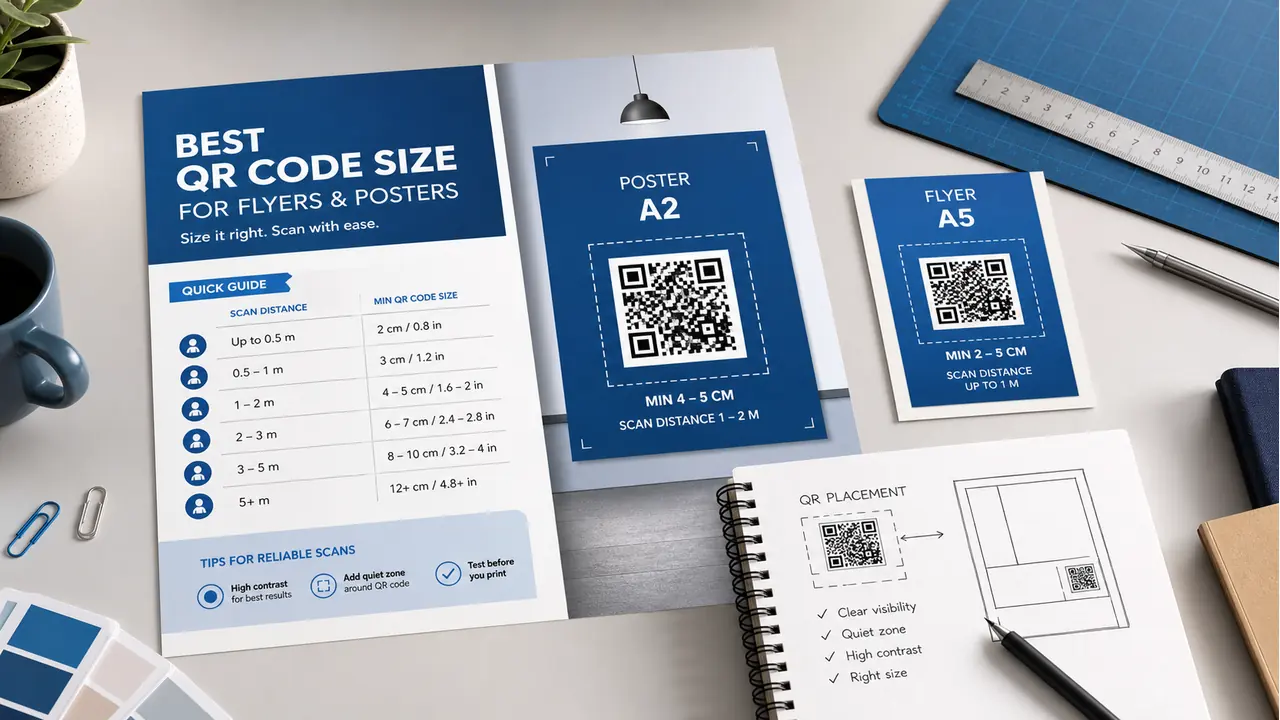
Best QR code size for flyers and posters
A QR code can look perfect on your screen and still fail in print. That usually happens when the QR code is too small, too low contrast, or placed in a busy design. It may look clean in the layout, but if people cannot scan it quickly, it is not doing its job.
The best QR code size depends on how far away people will scan it. A QR code on a business card can be smaller because people scan it up close. A QR code on a poster or wall sign needs to be larger because people may scan it from several feet away.
Minimum QR code size for print
For close-range print use, a common minimum size is about 0.8 inches by 0.8 inches, or 2 cm by 2 cm. This can work for business cards, small flyers, labels, and handouts where the person is scanning from close distance.
That does not mean every QR code should be that small. For flyers and posters, bigger is usually better. The goal is not to make the QR code barely scannable. The goal is to make scanning quick and easy.
Recommended QR code sizes
| Print material | Suggested QR code size |
|---|---|
| Business card | 0.8 to 1 inch |
| Small flyer | 1 to 1.25 inches |
| Standard flyer | 1.25 to 1.5 inches |
| Poster | 2 to 4 inches |
| Window sign | 4 inches or larger |
| Banner | Size based on viewing distance |
Use the scanning distance rule
A helpful rule is the 10:1 distance rule. The QR code should be roughly one-tenth of the expected scanning distance. For example, if people may scan from 30 inches away, the QR code should be around 3 inches wide.
This is not a perfect law, but it is a useful design check. The farther away the scanner is, the larger the QR code needs to be.
Best size for flyers
For flyers, try to keep the QR code around 1.25 to 1.5 inches when possible. If the flyer is small, 1 inch may work, but only if the code has strong contrast and enough white space around it.
Place the QR code near a clear call to action. Do not make people guess what it does. Use simple text like:
- Scan to register
- Scan to view details
- Scan to get the offer
- Scan to download the guide
- Scan to book a tour
Best size for posters
For posters, start around 2 inches and increase from there. If the poster will be viewed from across a room, hallway, event space, or storefront, make the QR code larger.
A poster QR code should not feel like a tiny decoration. If scanning is the main action, give it space.
Do not forget the quiet zone
The quiet zone is the blank space around the QR code. This space helps phone cameras detect the code. If text, photos, icons, or design elements are too close, the code may become harder to scan.
Keep a clear margin around the QR code. A white box behind the QR code is usually a smart move, especially if the background is colorful or busy.
Print quality matters
Use a sharp file format when sending QR codes to print. SVG, PDF, or high-resolution PNG files are better than stretched screenshots. A blurry QR code can fail even if the size is technically large enough.
Also use strong contrast. Black on white is safest. Brand colors can work, but avoid light colors on light backgrounds. A pale yellow QR code on white paper may look stylish, but it is not your friend.
Common mistakes to avoid
- Making the QR code too small
- Placing it too close to the edge of the flyer
- Putting it on a busy photo background
- Using low contrast colors
- Stretching or distorting the QR code
- Printing without testing first
How UniQrOnline helps
UniQrOnline helps you create print-ready QR codes with custom colors, logos, dynamic links, and tracking. You can create a QR code for your flyer or poster, test it, and use a dynamic destination so the printed code can still be updated later.
That is especially useful for events, school campaigns, restaurant menus, real estate signs, and promotional flyers.
Final recommendation
For flyers, use at least 1 to 1.5 inches when the layout allows. For posters, use at least 2 inches and increase the size based on scanning distance.
Clean design is good. A QR code that people can scan without fighting their phone is better.