
Static vs dynamic QR codes: which one should you use?
Learn the difference between static and dynamic QR codes, when to use each, and why dynamic QR codes are better for campaigns.
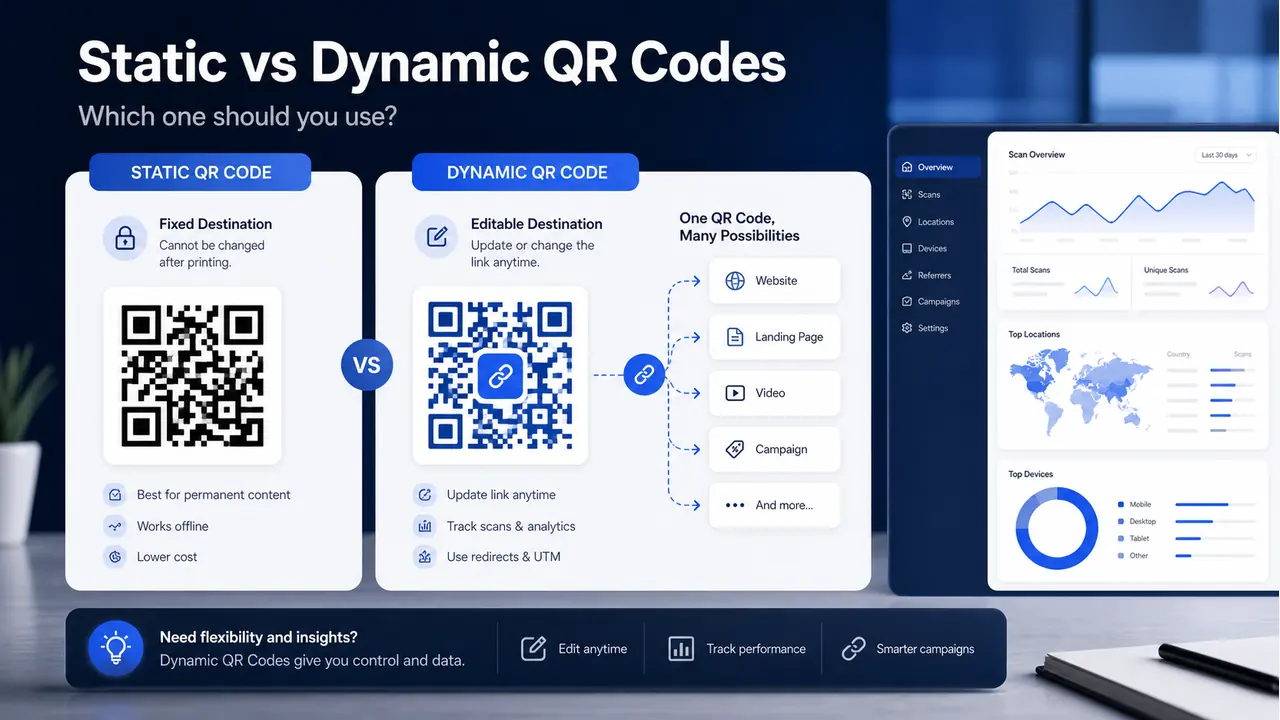
Static vs dynamic QR codes: which one should you use?
A QR code may look simple, but the type you choose can make a big difference later. This matters most when you are printing flyers, posters, business cards, menus, signs, or event materials. Once something is printed, fixing a mistake is not fun. It usually means reprinting, replacing, and explaining what went wrong.
The main choice is between a static QR code and a dynamic QR code. Both can send people to a website or digital content, but they work differently.
What is a static QR code?
A static QR code stores the final information directly inside the QR code. If the QR code points to a URL, that exact URL is built into the code. Once you create it, the destination cannot be changed.
Static QR codes are useful when the information is permanent. For example, you can use a static QR code for a basic website link, Wi-Fi login, plain text, phone number, or contact details that will not change.
The good part is that static QR codes are simple. The bad part is also that they are simple. If the link changes, the printed QR code is stuck pointing to the old place.
What is a dynamic QR code?
A dynamic QR code works through a short redirect link. The QR code points to a managed link first, and that managed link sends the visitor to the final destination. Because the final destination is controlled from a dashboard, you can update it later without changing the printed QR code.
That is the big win. You can print one QR code and still change the destination later. This is helpful for campaigns, events, seasonal offers, restaurant menus, university pages, real estate listings, and business promotions.
Dynamic QR codes can also support tracking. That means you can see useful campaign data such as scans, devices, dates, and campaign performance. For print marketing, that is a big upgrade because print is usually hard to measure.
When should you use a static QR code?
Use a static QR code when the content is simple and unlikely to change.
- Permanent website links
- Simple contact information
- Wi-Fi access details
- Internal office signs
- One-time personal use
Static QR codes are fine when there is no campaign, no tracking need, and no risk of the link changing later.
When should you use a dynamic QR code?
Use a dynamic QR code when the QR code will be printed, shared publicly, or used for marketing.
- Flyers and posters
- Event banners
- Business cards
- Restaurant menus
- Real estate signs
- University campaigns
- Fundraising materials
- Product packaging
- Print ads
If the QR code is part of a campaign, dynamic is usually the smarter choice. You can update the link later, track performance, and avoid wasting printed material.
Real example
Let’s say you print 2,000 posters for an open house event. The QR code points to the registration page. A few days later, the registration link changes.
If you used a static QR code, you now have 2,000 posters with the wrong link. Painful.
If you used a dynamic QR code, you simply update the destination link in your dashboard. The posters stay the same, but future scans go to the new page. Clean save.
Common mistakes to avoid
- Using static QR codes for printed campaigns: If the link may change, use dynamic.
- Not testing before printing: Always scan the final design before sending it to print.
- Using long messy URLs: Long URLs can create denser QR codes. Dynamic QR codes usually keep the scan pattern cleaner.
- Forgetting tracking: If you care about campaign results, use a trackable QR code.
- Changing the landing page without checking the QR: Always test the full scan journey.
How UniQrOnline helps
UniQrOnline lets you create both static and dynamic QR codes. For serious use, dynamic QR codes are more flexible because you can update the destination, organize campaigns, add UTM links, customize the design, and track scan activity.
You can also create branded QR codes with your logo and colors, which helps your QR code look more professional on printed materials.
Final recommendation
Use a static QR code for simple, permanent information. Use a dynamic QR code for anything printed, public, trackable, or campaign-related.
The simple rule is this: if changing the link later would save you time or money, choose dynamic.